


Avia Weather - METAR & TAF
4.92.85K Reviews
App Specs
- Version
- 3.10.1
- Updated On
- License
- Free
- Downloads
- 500,000+
- Developer
- Remy Webservices UG
- Categories
- Weather
- Platform
- Android
Screenshots
 Analysis by AppCompare
Connectivity is part of the experience with Avia Weather - METAR & TAF, because aviation weather reports matter most when they are current. I find the app most useful when I can check conditions deliberately before a trip, rather than treating a quick glance as a substitute for flight-planning judgment. It focuses on METAR and TAF information, so it serves a different purpose from a general forecast app built around broad daily summaries.
When a connection is available
On a normal connected check, the appeal is direct access to airport weather reports in one place. That can save time when I want to compare a departure airport with a destination or keep several familiar locations in view. The app is free to download, and its developer is Remy Webservices UG. Its strong average rating, supported by tens of thousands of ratings, suggests that many users appreciate this focused approach, though popularity is not a replacement for checking whether its format suits your own routine.
The practical benefit is less about browsing a large weather map and more about getting to aviation-specific information without first filtering through general-purpose forecasts. If I am checking a route, I would review the relevant stations in sequence and pay attention to the report times as well as the conditions. A report that looks reassuring at first glance still needs to be read in context; the app can make information easier to reach, but it cannot make a decision on a pilot’s behalf.
Using it between places and tasks
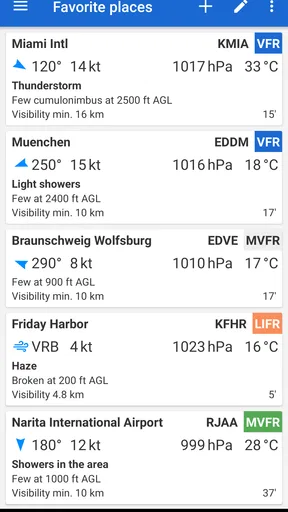
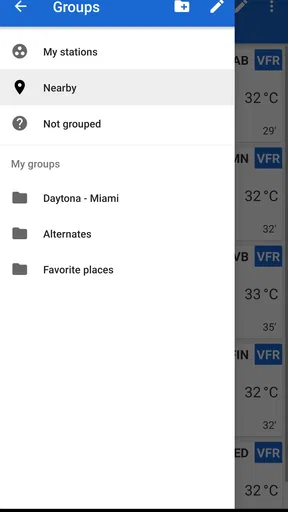
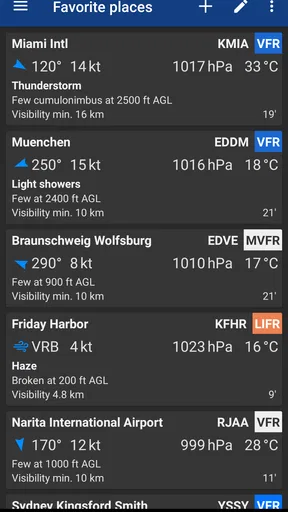
For a pilot moving between home, an airport, and a briefing area, a saved airport list can make repeat checks less fiddly. Rather than searching for the same stations every time, I would keep the locations I regularly need close at hand, then revisit them when the plan changes. That workflow is especially useful for someone who flies familiar routes, while a casual user interested in the weather across a whole city may find a conventional forecast app more immediately readable.
A realistic use would be checking the departure and destination reports before leaving for the airport, then looking again after a delay or a change in plans. Notifications may help draw attention to a significant update, but I would still open the report and assess it rather than relying on an alert as the full picture. In practice, that makes notifications a prompt to review conditions, not a shortcut around the review itself.
What to do when conditions or access change
Weather planning is time-sensitive, so I would avoid building a decision around a report viewed much earlier in the day. If a connection is unreliable, I would not assume the app can refresh or provide current reports without access; I would arrange a dependable way to obtain the information needed before relying on it. When access returns, checking the report time and refreshing the picture of the route is a sensible recovery step, especially if the delay has changed the expected departure window.
The app’s focus also creates a useful boundary. It is designed around aviation reports, not as a complete replacement for every briefing resource or operational procedure. I would use it to inspect METAR and TAF details, then cross-check anything important through the sources and processes appropriate to the flight. That extra step is not a weakness unique to this app; it is part of using weather information responsibly.
Worth Reading Before You Choose

EA SPORTS FC Mobile 26 Is a Bigger Football Game, but It Takes Time

Flipboard Shows What News Apps Must Do Beyond the Feed

Switching to Android Auto Means Rethinking Your Driving Routine

Google Calendar Makes a Crowded Week Easier to Manage

Ludo King Makes the Most of the Minutes Between Plans

Baby Panda World Brings Quick Play to Modern Phones, but Its Game Library Feels Busy
Keeping checks focused
For people mindful of mobile data, a practical habit is to open the app when they have a clear question, such as whether the destination report has changed, rather than repeatedly checking without a purpose. Keeping a short list of relevant airports can also make those sessions more focused. I would not assume that any app-specific data-saving mode or offline capability is available; the useful takeaway is simply to plan checks around the information needed and verify that the displayed reports are current.
Compared with mainstream weather apps, this one has a narrower audience and a more specialized vocabulary. General apps are often better for deciding whether to bring a coat or planning a day outdoors, while an aviation-focused reader is more appropriate when airport METAR and TAF reports are the point. The trade-off is that newcomers may need time to become comfortable with aviation abbreviations, even when the app offers help interpreting them.
It is available at no upfront cost and is rated for everyone. Optional in-app purchases range from under a dollar to around twenty dollars per item, so I would check the purchase details in the app before committing to anything. The current release is version 3.9.6, and it supports devices running version 8.0 or later of its mobile operating system. It has been available since 2014 and has passed half a million installs, but those figures matter less than whether its aviation-specific workflow fits your needs.
I would recommend it most to pilots and aviation enthusiasts who want airport weather reports close at hand and are comfortable treating the app as one part of a careful planning process. Someone who mainly wants a simple hourly forecast, broad radar browsing, or a quick everyday rain check will probably be happier with a general weather app. For an aviation user, the strongest reason to choose it is the focused access; the main trade-off is that connectivity, report timing, and the user’s own interpretation all remain important.
Have you ever found yourself squinting at the sky, trying to figure out if your flight plans are going to be smooth sailing or a turbulent nightmare? Well, you're not alone, and that's where Avia Weather - METAR & TAF swoops in to save the day. I’ve been playing around with this app for a bit, and let me tell you, it’s like having a weather-savvy co-pilot in your pocket. Let's dive into what makes this app a must-have for any aviation enthusiast or professional pilot.
Getting Started with Avia Weather
Setting up Avia Weather - METAR & TAF is as easy as pie. As soon as you download it, you're greeted with a sleek, user-friendly interface that doesn’t mess around. The app is designed to get you straight to the information you need without any unnecessary frills. You can instantly see the latest METAR and TAF reports, which are crucial for flight planning. The setup process is a breeze, and you’ll be navigating through the app like a pro in no time.
Features That Take Flight
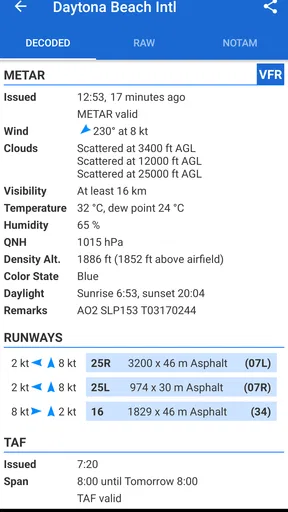
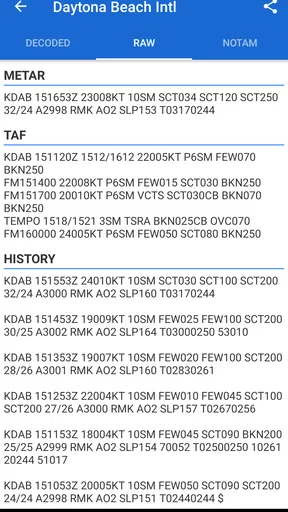
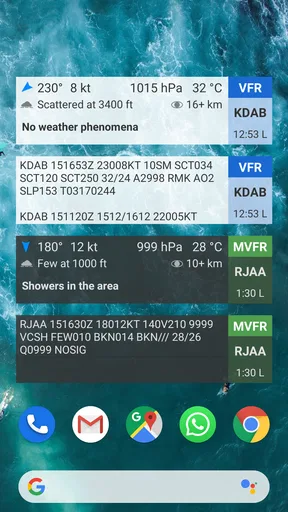
One of the standout features of this app is its real-time updates. You can rest assured that the weather data you’re getting is fresh off the press. Avia Weather provides detailed METAR and TAF reports, which are essential for understanding current weather conditions and forecasts at your departure and arrival airports.
- Customizable Airport List: You can easily create a list of your favorite airports to keep tabs on the weather conditions there. This is a lifesaver if you have specific routes you frequently travel.
- Notifications: Want to know when there’s a significant weather update? Set up notifications and never miss out on crucial weather changes.
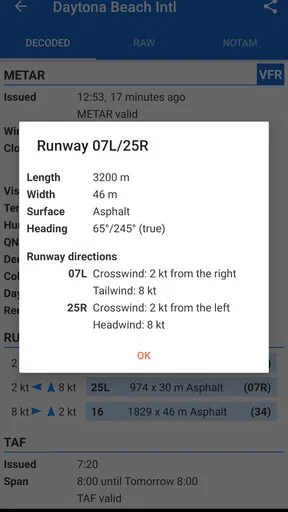
- Decoding Made Easy: METAR and TAF reports can be as cryptic as a secret code, but this app simplifies it with easy-to-understand translations.
User Experience
The app isn’t just about functionality; it’s also a delight to use. The interface is clean and intuitive, which makes checking weather conditions feel less like a chore and more like a quick, satisfying task. I especially love the visual aids that help you quickly grasp the situation, whether it’s diagrams showing wind conditions or graphical representations of temperature and precipitation.
Real-World Application
If you're a pilot or someone who’s deeply involved in aviation, this app is a game changer. It’s like having an aviation meteorologist right at your fingertips. Whether you're planning a cross-country flight or just want to check the weather before heading to the airport, this app has got your back. It’s also perfect for aviation enthusiasts who just want to keep an eye on the skies.
One of my personal favorite features is the ability to view historical weather data. It’s fascinating to see how conditions have changed over time, and it’s a useful tool for analyzing patterns and trends in specific regions.
Final Thoughts
In the vast sky of weather apps, Avia Weather - METAR & TAF is a star player. It’s reliable, accurate, and packed with features that make it an indispensable tool for anyone involved in aviation. Whether you’re a seasoned pilot or simply someone who loves to keep an eye on the weather, this app is worth its weight in gold. So, next time you’re prepping for a flight or just curious about the weather, give Avia Weather a try. You’ll wonder how you ever managed without it.
Ready to take the skies with confidence? Download Avia Weather and make your flight planning smoother than ever.
Pros
- Accurate weather data for pilots.
- User-friendly interface for quick access.
- Customizable notifications for updates.
- Supports multiple languages.
- Offline access to last downloaded data.
Cons
- Requires internet for real-time updates.
- Limited features in free version.
- Occasional loading delays reported.
- Interface may feel basic to some users.
- No integration with flight planning apps.
FAQs for Avia Weather - METAR & TAF
What features does Avia Weather offer for aviation enthusiasts and professionals?
Avia Weather provides real-time METAR and TAF data, offering comprehensive weather reports crucial for pilots and aviation enthusiasts. It includes detailed weather conditions, forecasts, and alerts, ensuring users have the most up-to-date information to plan flights safely. The user-friendly interface makes it easy to interpret complex weather data, essential for flight preparation.
Is Avia Weather available for both Android and iOS devices?
Yes, Avia Weather is available on both Android and iOS platforms. This ensures that users can access critical aviation weather information regardless of their device preference. The app is optimized for both operating systems, providing a seamless experience whether you're using a smartphone or a tablet.
Does Avia Weather require a subscription or is it free to use?
Avia Weather offers a free version with essential features. However, for those who require more advanced functionalities, there is a premium subscription available. The premium version might include features like ad-free usage, more detailed weather data, and additional customization options. It's advisable to check the app store for detailed pricing and feature comparisons.
How accurate is the weather information provided by Avia Weather?
Avia Weather sources its data from reliable and authoritative global aviation meteorological databases, ensuring high accuracy and reliability. The app frequently updates METAR and TAF reports, which are crucial for real-time weather monitoring and flight planning. Users can trust the app for precise weather conditions and forecasts needed for safe aviation operations.
Can I customize the notifications and alerts in Avia Weather?
Yes, Avia Weather allows users to tailor notifications and alerts to their specific needs. You can set up alerts for particular weather conditions, ensuring you're notified about changes that might impact flight plans. This customization helps maintain awareness of critical weather updates, enhancing safety and preparedness for pilots and aviation enthusiasts.


